

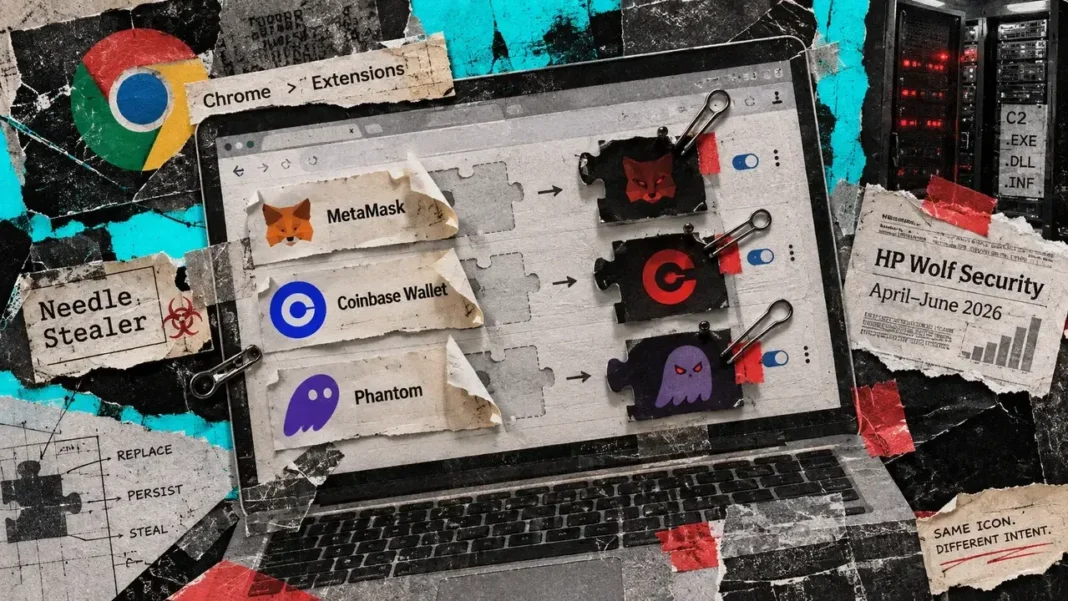

According to HP Wolf Security—the company’s threat-research team—a fraudulent AI crypto-trading assistant distributed malware capable of substituting browser crypto wallet extensions on infected Windows computers, transforming familiar wallet interfaces into credential traps.
Featured in HP’s September threat report published on Sept. 17 and drawing on threats observed between April and June 2026, the campaign involved a compromise starting on a user’s endpoint after they downloaded and executed a counterfeit trading tool. This incident did not represent a breach of official Coinbase or MetaMask extensions, nor of the companies themselves.
Malwarebytes previously documented the TradingClaw campaign in April, discovering that Needle Stealer was also distributed via other malware loaders, with the fake AI assistant serving as one pathway into a wider malware operation.
The complete HP report notes that attackers advertised tradingclaw[.]pro as an AI assistant capable of executing round-the-clock trades using personalized strategies. Through paid advertisements and search-engine poisoning, potential victims were steered toward a ZIP file disguised as the software installer.
Inside the archive were an executable called Trading Agent.exe alongside a DLL named iviewers.dll. HP identified the executable as OLEView—Microsoft’s official, digitally signed OLE/COM Object Viewer—noting that this legitimate signed utility helped evade Microsoft’s SmartScreen reputation filters while the malicious payload stayed hidden inside the accompanying DLL.
Executing the seemingly safe program triggered the loading of that DLL. Subsequently, the code decrypted Needle Stealer and employed process hollowing, a method that executes malicious instructions inside a newly initiated legitimate process.
How the crypto wallet swap worked
Needle Stealer scanned Chromium-based browser extensions, comparing their 32-character IDs against a built-in list that included Phantom, Trust Wallet, Atomic Wallet, Coinbase Wallet, OKX Wallet, MetaMask, and Tonkeeper.
Upon locating a targeted extension, the malware terminated the browser and unpacked a malicious replacement extension directly into the existing extension directory.
Upon its initial startup, this substitute extension communicated with a command-and-control server operated by the attacker, while also loading backup domains. HP pointed out that the attackers designed convincing login screens, allowing any crypto wallet ID and password entered into the fake interface to be transmitted directly to the operator.
While MetaMask advises that passwords for wallets created using a Secret Recovery Phrase only unlock the local application and cannot restore the wallet on another device, the counterfeit extension functioned on a device that was already compromised, putting locally accessible funds in jeopardy.
The overall scale of the operation remains undetermined, as neither HP’s newsroom summary nor its full report provided an aggregate financial loss total or the total number of victims affected.
Frequently Asked Questions
What did the fake AI crypto software do?
It distributed malware that replaced legitimate browser crypto wallet extensions on infected Windows computers with counterfeit versions designed to capture user credentials.
How was the malware delivered to victims?
Attackers used search-engine poisoning and paid ads to direct users to tradingclaw[.]pro, where they downloaded a ZIP file containing a legitimate Microsoft utility and a malicious DLL.
Which crypto wallets were targeted?
Needle Stealer targeted extensions for Phantom, Trust Wallet, Atomic Wallet, Coinbase Wallet, OKX Wallet, MetaMask, and Tonkeeper.
Were official platforms like MetaMask or Coinbase breached?
No, the compromise occurred locally on user endpoints after downloading the counterfeit tool, rather than through any security breach of official platforms or extensions.